Compilando minis en linux me he encontrado con 2 errores en el objeto Gtk.Clipboard
me dice que WaitIsImageAvailable() no esta en el espacio de nombres de Gtk.Clipboard y tambien clip.WaitForImage() no se encuentra, pero el caso de que tengo instalado Mono-1.1.16.1 tanto en Linux como en Windows, pero en Windows no existe error alguno, pero en linux me da estos 2 errores, por lo que por el momento la funcion de pegado de imagen en minis solo estara disponible en windows (que mala pata) y en linux pues buscare como arreglarlo, pero si alguien sabe que pasa y se anima a iluminarme lo agradecere en grande.
23 agosto 2006
He retirado la encuesta
Ayer se me ha ocurrido entrar y ver el resultado de la encuesta que habia colocado en este blog, el cuestionamiento era sobre que se deberian de enfocar los ejemplos de c# aqui mostrados y cual es mi sorpresa que me encontre con una ventana emergente que me decia que mi equipo estaba vulnerable y otros rollos, principalmente era un addware (creo que asi se llama) y pues le dije adios a esta encuesta, pues no fueran a pensar que era obra mia, pero nada de esto, la encuesta la habia agregado de un servicio gratuito a este blog, pero pues asi son las cosas, pero en fin despues de varios meses ya me di cuenta de lo que debo de enfocar mis ejemplos, ganando rotundamente ejemplos con bases de datos con 12 votos (que barbaro) nunca imagine recibir tantos votos!
14 agosto 2006
Mejoras en minis-0.0.1
minis-0.0.1 ahora tiene una mejora, se incorporo la funcion de carga de imagenes desde el portapapeles, incluso si capturan la pantalla con printscreen de igual forma tambien la puede pegar y despues generarse su thumbnail (miniatura), de igual forma pueden bajar el paquete con todos los cambios incluidos.
descargar minis-0.0.1
Este es el codigo anexado
public void on_bPegar_clicked(System.Object b, EventArgs e)
{
Gtk.Clipboard clip = Gtk.Clipboard.Get(Gdk.Atom.Intern("CLIPBOARD", true));
//Se verifica que el contenido del portapapeles sea una imagen valida
if(clip.WaitIsImageAvailable() == true)
{
Gdk.Pixbuf ImagenScreen = clip.WaitForImage();
ImagenScreen.Save("screen.jpg","jpeg");
NombreImagen = "screen.jpg";
Gdk.Pixbuf escalar;
escalar = ImagenScreen.ScaleSimple (460, 380, Gdk.InterpType.Hyper);
ImagenActual.Pixbuf = escalar;
ImagenMiniatura.Pixbuf = Thumbnail(NombreImagen, Ancho.ValueAsInt, Alto.ValueAsInt);
}
else
mensaje("El Portapapeles no contiene una imagen valida!", MessageType.Warning);
}
Aqui la pantalla del cambio y nueva imagen

descargar minis-0.0.1
Este es el codigo anexado
public void on_bPegar_clicked(System.Object b, EventArgs e)
{
Gtk.Clipboard clip = Gtk.Clipboard.Get(Gdk.Atom.Intern("CLIPBOARD", true));
//Se verifica que el contenido del portapapeles sea una imagen valida
if(clip.WaitIsImageAvailable() == true)
{
Gdk.Pixbuf ImagenScreen = clip.WaitForImage();
ImagenScreen.Save("screen.jpg","jpeg");
NombreImagen = "screen.jpg";
Gdk.Pixbuf escalar;
escalar = ImagenScreen.ScaleSimple (460, 380, Gdk.InterpType.Hyper);
ImagenActual.Pixbuf = escalar;
ImagenMiniatura.Pixbuf = Thumbnail(NombreImagen, Ancho.ValueAsInt, Alto.ValueAsInt);
}
else
mensaje("El Portapapeles no contiene una imagen valida!", MessageType.Warning);
}
Aqui la pantalla del cambio y nueva imagen

13 agosto 2006
minis-0.0.1 gtksharp-2.0
Despues de corregir ciertos detalles de minis aqui dejo el enlace para su descarga con todos los archivos necesarios.
Aclaracion: el codigo mostrado anteriormente se puede compilar con gtk-sharp inferior a 2.0
El codigo aqui disponible para su descarga es para compilarse con gtksharp 2.8.3
Requerimientos:
mono-1.1.16.1
gtk-sharp-2.8.3
descargar minis-0.0.1
Mas informacion de minis
Aclaracion: el codigo mostrado anteriormente se puede compilar con gtk-sharp inferior a 2.0
El codigo aqui disponible para su descarga es para compilarse con gtksharp 2.8.3
Requerimientos:
mono-1.1.16.1
gtk-sharp-2.8.3
descargar minis-0.0.1
Mas informacion de minis
12 agosto 2006
Minis-0.0.1
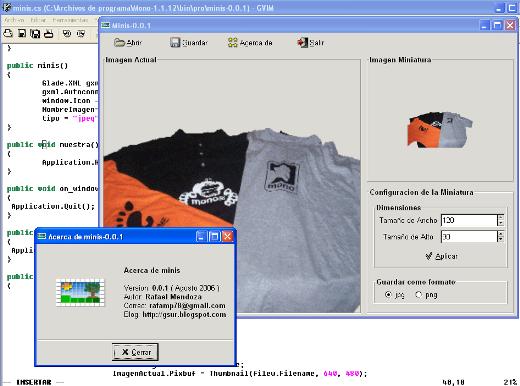
Ya encarrerado con esto de los Thumb's, agarre parte del codigo de dbimage y lo transforme en minis, que viene siendo un programa para abrir una imagen y pasarla a miniatura, minis tiene la opcion de configurar el tamaño de la miniatura y el formato de la imagen resultante, puede ser jpg o png, por el momento es funcional claro con detalles que arreglar, pero ya se puede utilizar con cierto grado de confianza, aqui dejo la pantalla, y el codigo, si gustas mejorarlo o utilizarlo como esta pueden hacerlo solo no olviden comentar a su autor.
Lenguaje utilizado: c#
Entorno de desarrollo: Mono 1.1.12

Aqui dejo el codigo
//------------------------------------------------------------------------------------------------------------------
// Proyecto: Convertidor de Imagenes a tamaño miniatura (thumbnails)
// Desarrollo: gsur
// Fecha: 12/08/2006
// Compilar:
// mcs minis.cs AcercaDe.cs -out:minis.exe -pkg:gtk-sharp -pkg:glade-sharp -resource:minis-0.0.1.glade;acercade.glade
// Entorno de desarrollo: Mono
//blog: http://gsur.blogspot.com
//------------------------------------------------------------------------------------------------------------------
using System;
using Gtk;
using Glade;
public class minis
{
[Glade.Widget] Gtk.Window window;
[Glade.Widget] Gtk.SpinButton Ancho;
[Glade.Widget] Gtk.SpinButton Alto;
[Glade.Widget] Gtk.Image ImagenActual;
[Glade.Widget] Gtk.Image ImagenMiniatura;
static FileSelection filew;
static string tipo;
string NombreImagen;
public static void Main(String[] args)
{
Application.Init();
minis prog = new minis();
prog.muestra();
}
public minis()
{
Glade.XML gxml=new Glade.XML(null, "minis-0.0.1.glade","window",null);
gxml.Autoconnect(this);
window.Icon = new Gdk.Pixbuf("minisico.png");
NombreImagen="";
tipo = "jpeg";
}
public void muestra()
{
Application.Run();
}
public void on_window_delete_event(object o, DeleteEventArgs args)
{
Application.Quit();
}
public void on_bSalir_clicked(System.Object b, EventArgs e)
{
Application.Quit();
}
public void on_bAbrir_clicked(System.Object b, EventArgs e)
{
filew = new FileSelection("Archivo de Imagen");
filew.HideFileopButtons ();
filew.Filename = NombreImagen;
ResponseType r = (ResponseType) filew.Run();
if(r == ResponseType.Ok)
{
try
{
NombreImagen = filew.Filename;
ImagenActual.Pixbuf = Thumbnail(filew.Filename, 640, 480);
ImagenMiniatura.Pixbuf = Thumbnail(NombreImagen, Ancho.ValueAsInt, Alto.ValueAsInt);
filew.Destroy();
}
catch(Exception error)
{
Console.WriteLine(error);
}
filew.Destroy();
}
else
filew.Destroy();
}
public void on_bGuardar_clicked(System.Object b, EventArgs e)
{
String msg;
Gtk.FileSelection fileg = new FileSelection("Guardar Miniatura como");
fileg.HideFileopButtons ();
fileg.SetResponseSensitive(ResponseType.Ok,false);
fileg.AddButton(Stock.Save,ResponseType.Ok);
fileg.Filename = NombreImagen;
fileg.Icon= new Gdk.Pixbuf("minisico.png");
ResponseType r = (ResponseType) fileg.Run();
if(r == ResponseType.Ok)
{
if(Guardar(fileg.Filename))
{
msg="\n\nSe ha guardado la miniatura";
mensaje(msg, MessageType.Info);
}
else
{
msg="\n\nOcurrio Error al guardar!";
mensaje(msg, MessageType.Warning);
}
fileg.Destroy();
}
else
fileg.Destroy();
}
public void on_bAplicar_clicked(System.Object b, EventArgs e)
{
if(NombreImagen == "")
mensaje("Debe abrir una imagen valida!", MessageType.Warning);
else
ImagenMiniatura.Pixbuf = Thumbnail(NombreImagen, Ancho.ValueAsInt, Alto.ValueAsInt);
}
public void on_bAcerca_clicked(System.Object b, EventArgs e)
{
new AcercaDe();
}
Gdk.Pixbuf Thumbnail(string nombre, int ancho, int alto)
{
Gdk.Pixbuf p = new Gdk.Pixbuf(nombre);
Gdk.Pixbuf thumb;
thumb = p.ScaleSimple(ancho, alto, Gdk.InterpType.Hyper);
return thumb;
}
void mensaje(string mensaje, MessageType MensajeTipo)
{
MessageDialog md = new MessageDialog(
window,
DialogFlags.DestroyWithParent,
MensajeTipo,
ButtonsType.Ok,
mensaje);
ResponseType rok = (ResponseType) md.Run();
if(rok == ResponseType.Ok)
{
md.Destroy();
}
}
bool Guardar(string NombreGuardar)
{
try
{
Gdk.Pixbuf temp;
temp = ImagenMiniatura.Pixbuf;
temp.Savev(NombreGuardar + "." + tipo,tipo,null,null);
return true;
}
catch(Exception e)
{
return false;
}
}
public void on_opjpg_toggled(System.Object b, EventArgs e)
{
tipo = "jpeg";
}
public void on_oppng_toggled(System.Object b, EventArgs e)
{
tipo = "png";
}
}
Lenguaje utilizado: c#
Entorno de desarrollo: Mono 1.1.12
Pantalla de minis en accion
Aqui dejo el codigo
//------------------------------------------------------------------------------------------------------------------
// Proyecto: Convertidor de Imagenes a tamaño miniatura (thumbnails)
// Desarrollo: gsur
// Fecha: 12/08/2006
// Compilar:
// mcs minis.cs AcercaDe.cs -out:minis.exe -pkg:gtk-sharp -pkg:glade-sharp -resource:minis-0.0.1.glade;acercade.glade
// Entorno de desarrollo: Mono
//blog: http://gsur.blogspot.com
//------------------------------------------------------------------------------------------------------------------
using System;
using Gtk;
using Glade;
public class minis
{
[Glade.Widget] Gtk.Window window;
[Glade.Widget] Gtk.SpinButton Ancho;
[Glade.Widget] Gtk.SpinButton Alto;
[Glade.Widget] Gtk.Image ImagenActual;
[Glade.Widget] Gtk.Image ImagenMiniatura;
static FileSelection filew;
static string tipo;
string NombreImagen;
public static void Main(String[] args)
{
Application.Init();
minis prog = new minis();
prog.muestra();
}
public minis()
{
Glade.XML gxml=new Glade.XML(null, "minis-0.0.1.glade","window",null);
gxml.Autoconnect(this);
window.Icon = new Gdk.Pixbuf("minisico.png");
NombreImagen="";
tipo = "jpeg";
}
public void muestra()
{
Application.Run();
}
public void on_window_delete_event(object o, DeleteEventArgs args)
{
Application.Quit();
}
public void on_bSalir_clicked(System.Object b, EventArgs e)
{
Application.Quit();
}
public void on_bAbrir_clicked(System.Object b, EventArgs e)
{
filew = new FileSelection("Archivo de Imagen");
filew.HideFileopButtons ();
filew.Filename = NombreImagen;
ResponseType r = (ResponseType) filew.Run();
if(r == ResponseType.Ok)
{
try
{
NombreImagen = filew.Filename;
ImagenActual.Pixbuf = Thumbnail(filew.Filename, 640, 480);
ImagenMiniatura.Pixbuf = Thumbnail(NombreImagen, Ancho.ValueAsInt, Alto.ValueAsInt);
filew.Destroy();
}
catch(Exception error)
{
Console.WriteLine(error);
}
filew.Destroy();
}
else
filew.Destroy();
}
public void on_bGuardar_clicked(System.Object b, EventArgs e)
{
String msg;
Gtk.FileSelection fileg = new FileSelection("Guardar Miniatura como");
fileg.HideFileopButtons ();
fileg.SetResponseSensitive(ResponseType.Ok,false);
fileg.AddButton(Stock.Save,ResponseType.Ok);
fileg.Filename = NombreImagen;
fileg.Icon= new Gdk.Pixbuf("minisico.png");
ResponseType r = (ResponseType) fileg.Run();
if(r == ResponseType.Ok)
{
if(Guardar(fileg.Filename))
{
msg="\n\nSe ha guardado la miniatura";
mensaje(msg, MessageType.Info);
}
else
{
msg="\n\nOcurrio Error al guardar!";
mensaje(msg, MessageType.Warning);
}
fileg.Destroy();
}
else
fileg.Destroy();
}
public void on_bAplicar_clicked(System.Object b, EventArgs e)
{
if(NombreImagen == "")
mensaje("Debe abrir una imagen valida!", MessageType.Warning);
else
ImagenMiniatura.Pixbuf = Thumbnail(NombreImagen, Ancho.ValueAsInt, Alto.ValueAsInt);
}
public void on_bAcerca_clicked(System.Object b, EventArgs e)
{
new AcercaDe();
}
Gdk.Pixbuf Thumbnail(string nombre, int ancho, int alto)
{
Gdk.Pixbuf p = new Gdk.Pixbuf(nombre);
Gdk.Pixbuf thumb;
thumb = p.ScaleSimple(ancho, alto, Gdk.InterpType.Hyper);
return thumb;
}
void mensaje(string mensaje, MessageType MensajeTipo)
{
MessageDialog md = new MessageDialog(
window,
DialogFlags.DestroyWithParent,
MensajeTipo,
ButtonsType.Ok,
mensaje);
ResponseType rok = (ResponseType) md.Run();
if(rok == ResponseType.Ok)
{
md.Destroy();
}
}
bool Guardar(string NombreGuardar)
{
try
{
Gdk.Pixbuf temp;
temp = ImagenMiniatura.Pixbuf;
temp.Savev(NombreGuardar + "." + tipo,tipo,null,null);
return true;
}
catch(Exception e)
{
return false;
}
}
public void on_opjpg_toggled(System.Object b, EventArgs e)
{
tipo = "jpeg";
}
public void on_oppng_toggled(System.Object b, EventArgs e)
{
tipo = "png";
}
}
05 agosto 2006
Aqui la pantalla del dbimage
Aqui dejo la pantalla de como se ejecuta el programa generador de Thumbnails con c# en mono y gtk


Thumbnails con Mono - C# y Gtk
Despues de un tiempo de no poner codigo, aqui dejo lo que es el avance del organizador de fotos que estoy haciendo, donde incluire el almacenamiento en una base de datos (MySql), por el momento este codigo genera thumbnails y los muestra en un Treeview, todo esto esta programado en c# y Gtk.
Este codigo lo puedes utilizar y claro no olviden mencionar a gsur como su autor
//mcs -pkg:gtk-sharp dbimagen.cs
//mono dbimagen.exe
using System;
using Gtk;
using System.IO;
public class dbimagen
{
public static void Main()
{
Gtk.Application.Init();
new dbimagen();
Gtk.Application.Run();
}
static Gtk.TreeView tree;
static Gtk.Entry EntradaFolder;
static Gtk.Entry ancho;
static Gtk.Entry alto;
static FileSelection filew;
static Gtk.Entry EntradaThumb;
static Gtk.ListStore ImagenLista;
public dbimagen()
{
//Creacion de ventana
Gtk.Window window = new Gtk.Window("Generador de Thumbnails ver. 0.1");
window.SetSizeRequest(600, 400);
window.DeleteEvent+=new DeleteEventHandler(Window_Delete);
EntradaFolder = new Gtk.Entry();
Gtk.Label lblFolder = new Gtk.Label("Folder: ");
Gtk.HBox BoxSup = new Gtk.HBox();
Gtk.Button bexaminar = new Gtk.Button(Stock.Open);
bexaminar.Clicked += OnButtonClicked;
Gtk.Button bcargar = new Gtk.Button(Stock.Ok);
bcargar.Clicked += OnBCargarClicked;
Gtk.Label lblancho = new Gtk.Label("Ancho: ");
Gtk.Label lblalto = new Gtk.Label("Alto: ");
ancho = new Gtk.Entry("75");
alto = new Gtk.Entry("50");
BoxSup.PackStart(lblFolder, false, false, 5);
BoxSup.PackStart(EntradaFolder, false, false, 5);
BoxSup.PackStart(bexaminar, false, false, 5);
BoxSup.PackStart(bcargar, false, false, 5);
BoxSup.PackStart(lblancho, false, false, 5);
BoxSup.PackStart(ancho, true, true, 5);
BoxSup.PackStart(lblalto, false, false, 5);
BoxSup.PackStart(alto, true, true, 5);
//Creacion del Treeview donde se mostrara informacion de la imagen
tree = new Gtk.TreeView();
Gtk.VBox box = new Gtk.VBox();
box.PackStart(BoxSup, false, false, 5);
ScrolledWindow scrolledWindow = new ScrolledWindow ();
scrolledWindow.ShadowType = ShadowType.EtchedIn;
scrolledWindow.SetPolicy (PolicyType.Automatic, PolicyType.Automatic);
scrolledWindow.Add(tree);
box.PackStart (scrolledWindow, true, true, 5);
Gtk.HBox boxinf= new Gtk.HBox();
Gtk.Label lblnthumb = new Gtk.Label("Thumbnail Seleccionado ");
EntradaThumb = new Gtk.Entry();
Gtk.Button bguardar = new Gtk.Button(Stock.Save);
boxinf.PackStart(lblnthumb, false, false, 5);
boxinf.PackStart(EntradaThumb, false, false, 5);
boxinf.PackStart(bguardar, false, false, 5);
box.PackStart(boxinf, false, false, 5);
//Lo agregamos a la ventana
window.Add(box);
//Agregamos las columnas al Treeview
tree.AppendColumn("Miniatura",new Gtk.CellRendererPixbuf(),"pixbuf",0);
Gtk.TreeViewColumn NombreImagenColumna = new Gtk.TreeViewColumn();
NombreImagenColumna.Title = "Nombre de la Imagen";
Gtk.CellRendererText NombreImagenCelda = new Gtk.CellRendererText();
NombreImagenColumna.PackStart(NombreImagenCelda,true);
tree.AppendColumn(NombreImagenColumna.Title, new Gtk.CellRendererText(),"text",1);
tree.AppendColumn("Tipo",new Gtk.CellRendererText(),"text",2);
window.ShowAll();
}
static void OnBCargarClicked(object o, EventArgs args)
{
ImagenLista = new Gtk.ListStore(typeof(Gdk.Pixbuf), typeof(string), typeof(string));
string ndir = EntradaFolder.Text;
string nombreima;
DirectoryInfo dir = new DirectoryInfo(ndir);
FileInfo[] archivos = dir.GetFiles();
for(int i = 0; i < nombreima =" ndir" model =" ImagenLista;" twidth =" Convert.ToInt32(ancho.Text);" theight =" Convert.ToInt32(alto.Text);" pb =" new" thumb =" pb.ScaleSimple" retval="true;" filew =" new" filename = "" text =" filew.Filename;">
Este codigo lo puedes utilizar y claro no olviden mencionar a gsur como su autor
//mcs -pkg:gtk-sharp dbimagen.cs
//mono dbimagen.exe
using Gtk;
using System.IO;
public class dbimagen
{
public static void Main()
{
Gtk.Application.Init();
new dbimagen();
Gtk.Application.Run();
}
static Gtk.TreeView tree;
static Gtk.Entry EntradaFolder;
static Gtk.Entry ancho;
static Gtk.Entry alto;
static FileSelection filew;
static Gtk.Entry EntradaThumb;
static Gtk.ListStore ImagenLista;
public dbimagen()
{
//Creacion de ventana
Gtk.Window window = new Gtk.Window("Generador de Thumbnails ver. 0.1");
window.SetSizeRequest(600, 400);
window.DeleteEvent+=new DeleteEventHandler(Window_Delete);
EntradaFolder = new Gtk.Entry();
Gtk.Label lblFolder = new Gtk.Label("Folder: ");
Gtk.HBox BoxSup = new Gtk.HBox();
Gtk.Button bexaminar = new Gtk.Button(Stock.Open);
bexaminar.Clicked += OnButtonClicked;
Gtk.Button bcargar = new Gtk.Button(Stock.Ok);
bcargar.Clicked += OnBCargarClicked;
Gtk.Label lblancho = new Gtk.Label("Ancho: ");
Gtk.Label lblalto = new Gtk.Label("Alto: ");
ancho = new Gtk.Entry("75");
alto = new Gtk.Entry("50");
BoxSup.PackStart(lblFolder, false, false, 5);
BoxSup.PackStart(EntradaFolder, false, false, 5);
BoxSup.PackStart(bexaminar, false, false, 5);
BoxSup.PackStart(bcargar, false, false, 5);
BoxSup.PackStart(lblancho, false, false, 5);
BoxSup.PackStart(ancho, true, true, 5);
BoxSup.PackStart(lblalto, false, false, 5);
BoxSup.PackStart(alto, true, true, 5);
//Creacion del Treeview donde se mostrara informacion de la imagen
tree = new Gtk.TreeView();
Gtk.VBox box = new Gtk.VBox();
box.PackStart(BoxSup, false, false, 5);
ScrolledWindow scrolledWindow = new ScrolledWindow ();
scrolledWindow.ShadowType = ShadowType.EtchedIn;
scrolledWindow.SetPolicy (PolicyType.Automatic, PolicyType.Automatic);
scrolledWindow.Add(tree);
box.PackStart (scrolledWindow, true, true, 5);
Gtk.HBox boxinf= new Gtk.HBox();
Gtk.Label lblnthumb = new Gtk.Label("Thumbnail Seleccionado ");
EntradaThumb = new Gtk.Entry();
Gtk.Button bguardar = new Gtk.Button(Stock.Save);
boxinf.PackStart(lblnthumb, false, false, 5);
boxinf.PackStart(EntradaThumb, false, false, 5);
boxinf.PackStart(bguardar, false, false, 5);
box.PackStart(boxinf, false, false, 5);
//Lo agregamos a la ventana
window.Add(box);
//Agregamos las columnas al Treeview
tree.AppendColumn("Miniatura",new Gtk.CellRendererPixbuf(),"pixbuf",0);
Gtk.TreeViewColumn NombreImagenColumna = new Gtk.TreeViewColumn();
NombreImagenColumna.Title = "Nombre de la Imagen";
Gtk.CellRendererText NombreImagenCelda = new Gtk.CellRendererText();
NombreImagenColumna.PackStart(NombreImagenCelda,true);
tree.AppendColumn(NombreImagenColumna.Title, new Gtk.CellRendererText(),"text",1);
tree.AppendColumn("Tipo",new Gtk.CellRendererText(),"text",2);
window.ShowAll();
}
static void OnBCargarClicked(object o, EventArgs args)
{
ImagenLista = new Gtk.ListStore(typeof(Gdk.Pixbuf), typeof(string), typeof(string));
string ndir = EntradaFolder.Text;
string nombreima;
DirectoryInfo dir = new DirectoryInfo(ndir);
FileInfo[] archivos = dir.GetFiles();
for(int i = 0; i < nombreima =" ndir" model =" ImagenLista;" twidth =" Convert.ToInt32(ancho.Text);" theight =" Convert.ToInt32(alto.Text);" pb =" new" thumb =" pb.ScaleSimple" retval="true;" filew =" new" filename = "" text =" filew.Filename;">



03 agosto 2006
Mis playeras mono y gnome (1)
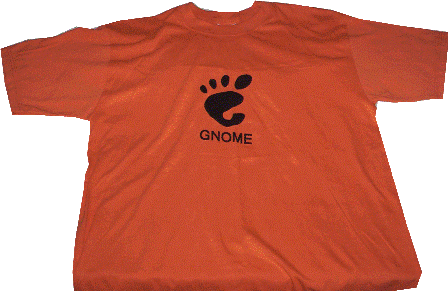
Que!!!! ya mas de un mes sin publicar nada, pero en fin de estos dias que no he escrito no hablaremos, y mejor ni pregunten si he programado por que de plano en este tema estoy mas frito, pero dejemos de hablar de cosas tristes y les comento que despues de buscar algunos souveniers (asi se escribe?) del ambiente de software libre, me canse de buscar y cotizar, pero no encontre nada, asi que me decidi por hacerme de unas playeras con el logo de gnome y claro de Mono no podian faltar, asi que me bajo los logos de algunos sitios (espero no exista algun problema legal) y nos lanzamos a una imprenta para cotizar cuanto me sale el estampado de los logos en las playeras, y bueno si no fuera por que llevaba freno quien sabe como hubiera terminado con mis estampados, en fin me convenci por el precio (aqui no lo pondre, no viene al caso) y ahora a escoger unas playeras para los logos, ya imaginaran el entusiasmo que me cargaba, bueno despues de todo esto, por fin tengo mis super playeras de Mono y Gnome y en la primer puesta me tomo la foto para subirlas aqui, a veces no queda de otra que hacerlo uno mismo si no tenemos las cosas a la mano.
20 junio 2006
Que mas queda
Andaba investigando sobre cursos o conferencias de software, linux o si fuera mejor sobre Mono, y lo que encontre me dejo algo pensativo, se que el conocimiento cuesta y que nada es gratis, pero las tarifas en realidad me sacaron de onda de momento, pero reflexione y llegue a la conclusión, si quieres un buen congreso tienes que traer a unos fregones, y pues cuesta traerlos asi que mas queda, mas que echarle ganas para engordar al marranito para poder ir a Veracruz ora en Diciembre.
 http://www.gulev.org.mx
 http://www.gulev.org.mx
18 junio 2006
Mi blog
Estaba viendo la fecha de mi ultima entrada y creo que ya pasaron muchos dias sin escribir nada y eso que dije que atenderia peticiones, pero ya esta ya tengo en mente el proximo ejemplo que abordare, es muy cierto que mucho de los que he empezado aun no estan terminados, pero en fin espero terminarlos un dia, asi que abordare este nuevo proyecto, que claro que algunas cosas no las sabre asi que tendre que investigar y en cierta forma las entradas no seran tan continuas, el proyecto en cuestion es un organizador de fotos o mas bien dicho algo asi como una agenda de fotos donde se almacene el nombre de la foto, la ubicacion, alguna descripcion de la foto, fecha, vista en miniatura y quizas algun herramienta adicional, y lo que pretendo utilizar sera C#, MySql y Gtk, quizas de primera intención se quede corta la aplicación pero como ejemplo yo creo que quedara practico.
08 junio 2006
Atenderemos peticiones
Despues de quien sabe cuantos dias, por que no anote la fecha de haber colocado la encuesta, llevo la nada despreciable cantidad de 4 votos y pues la mayoria de los votos piden que los ejemplos se enfoquen en bases de datos, y asi que atenderemos la peticion y pronto tendre algo de c# y MySql, claro con una interfaz en Gtk, asi que manos a la obra.
07 junio 2006
Solo en México?
Este tema creo que se saldra de lo que acostumbro escribir en mi humilde blog, pero en fin a lo voy, recientemente fue el debate con los candidatos a la presidencia y asi que cada televisora invito a un representante de cada partido para hablar ya en un posdebate, y con que se encuentra el televidente ante algo asi como una encuesta que te obliga a decidir entre ver noticias del mundial de futbol o mirar lo que dicen acerca del debate, y es buena pregunta que atraera mas la atención el mundial o el ajetreo politico ya casi a su cierre de campañas, bueno tenemos que aclarar que estoy hablando de los que solo tenemos 4 canales libres, por que los que gozan de un buen servicio de cable ni le piensan, y ahora ya entrando en el tema de politica, que podemos decir tenemos a 5 candidatos oficialmente reonocidos por el IFE y un candidato libre, en cierta forma me gustaria decir cual es mi gallo para votar, pero mejor lo mantengo en secreto para no recibir algun comentario (claro si leen este blog) negativo, lo unico que dire es que en mi estado llevamos un año que apostamos por el cambio despues de mas de 72 años y pues la verdad las cosas son diferentes, claro no vamos a pensar en que todo ya esta solucionado, pero por el momento se han visto cambios, y ahora elegir un presidente sera algo complejo y quizas seran de las elecciones mas cerradas, por lo que todos acudamos a dejar nuestro sufragio para despues no quejarnos o al menos poder alzar la voz cuando algo no nos convenga del ejecutivo.
31 mayo 2006
Almacenamiento de conocimiento
El día de ayer explorando un directorio de mi pc, me encontre con un interesante libro electronico con cerca de 771 páginas y de curiosidad lo abri y empece a recorrer y cual fue mi sorpresa que tenia la información que hace días andaba buscando en Google, entonces llego a mi mente, en que momento descargue este libro?, como lo busque?, por que lo baje?, y lo que mas me pregunte fue, por que demonios no lo habia leido?, si se supone que lo baje por que me interesaba este tema, en fin a lo llegue fue que muchas veces andamos vagando con busquedas en Google y descargamos cualquier cosa que consideramos interesante y convertimos nuestra pc en una maquina de almacenamiento de conocimiento al cual no siempre recurrimos para buscar y mas sin embargo de nueva cuenta volvemos a saturar de preguntas al google y el nos devuelve miles de respuestas, sin pensar que en nuestro enpolvado pc tenemos ya esta valiosa información, ahora me pregunto si yo soy el unico al que le ha sucedio esto, que almacena y almacena conocimiento en su pc.
30 mayo 2006
Conversor numero a letras con c# (1)
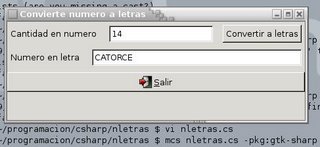
Aqui dejo la pantalla y un poco de codigo de los avances que llevo con este conversor de una cantidad numerica a su representación en letra, el codigo aun esta un poco enredoso, pero despues de concluir dedicare una etapa a corregir y mejorar el codigo y claro a incluir los comentarios ya que por el momento no se los he puesto.
Aqui la pantalla
Aqui la pantalla
Y aqui les dejo el codigo, espero sus comentarios y claro sus ideas para mejorar este programita, que quizas sencillo, pero a veces muy util cuando tienes que elaborarte un presupuestillo y necesitas poner la cantidad en letra.
using System;
using Gtk;
class nletras
{
static Gtk.Window w;
static Gtk.Entry tcantidad;
static Gtk.Entry tresultado;
static Gtk.Button bconvertir;
static Gtk.Button bsalir;
static String UnoAl15(double N)
{
String[] numero = new String[17];
numero[0] = "CERO ";
numero[1] = "UN ";
numero[2] = "DOS ";
numero[3] = "TRES ";
numero[4] = "CUATRO ";
numero[5] = "CINCO ";
numero[6] = "SEIS ";
numero[7] = "SIETE ";
numero[8] = "OCHO ";
numero[9] = "NUEVE ";
numero[10] = "DIEZ ";
numero[11] = "ONCE ";
numero[12] = "DOCE ";
numero[13] = "TRECE ";
numero[14] = "CATORCE ";
numero[15] = "QUINCE ";
return numero[Convert.ToInt32(N)];
}
static void Main()
{
Application.Init();
w = new Gtk.Window("Convierte numero a letras");
w.SetDefaultSize(450,150);
w.DeleteEvent += new DeleteEventHandler(Cerrar);
Gtk.VBox panelv = new Gtk.VBox();
Gtk.HBox panelsup = new Gtk.HBox(false, 5);
panelv.PackStart(panelsup,false, false, 5);
Gtk.Label lbl1 = new Gtk.Label("Cantidad en numero ");
tcantidad = new Gtk.Entry();
bconvertir = new Button("Convertir a letras");
bconvertir.Clicked += OnButtonClickedConvertir;
panelsup.PackStart(lbl1, false, false, 5);
panelsup.PackStart(tcantidad, false, false, 5);
panelsup.PackStart(bconvertir, false, false, 5);
Gtk.Label lbl2 = new Gtk.Label("Numero en letra ");
tresultado = new Gtk.Entry();
Gtk.HBox panelres = new Gtk.HBox(false, 5);
panelv.PackStart(panelres, false, false, 5);
panelres.PackStart(lbl2, false, false, 5);
panelres.PackStart(tresultado, true, true, 5);
bsalir = new Button(Stock.Quit);
bsalir.Clicked += OnButtonClicked;
panelv.PackStart(bsalir, false, false, 5);
w.Add(panelv);
w.ShowAll();
Application.Run();
}
static void Cerrar(object o, DeleteEventArgs args)
{
args.RetVal = true;
Application.Quit();
}
static void OnButtonClicked(object o, EventArgs args)
{
Application.Quit();
}
static void OnButtonClickedConvertir(object o, EventArgs args)
{
String aux = UnoAl15(Convert.ToDouble(tcantidad.Text));
tresultado.Text = aux;
}
}
27 mayo 2006
Ya tengo algo
Comentaba ayer que no tenia nada de programación y esperaba que en el fin de semana algo me iluminara y ya esta por ahi encontre un codigo en vba para transformar un número a su representación en letra, así que me pondre a traducir este codigo a su equivalente en c# y claro si se puede lo armamos con gtk y compilado con Mono, ahora me pondre manos a la obra y les aviso.
26 mayo 2006
Avances lentos
Ultimamente creo que no he trabajado nada de programación, creo que el avance es lento en mi aprendizaje, pero en fin, que mas da despues de terminar una semana de trabajo, me inspira para planear que programa hacer y practicar un poco de c#, asi que por el momento les dejare esta triste entrada en mi blog y espero no sean muy crueles y me llenen mi buzon con mensajes.
25 mayo 2006
Un intruso sospechoso
Recientemente mi conexión de internet la note algo extraña, para decir estaba lenta, por lo que aplique un netstat -a 3 y este me arrojo una linea como esta a204-2-128-167.deploy.akamaitechnologies.com y que ademas estaba la conexión establecida, me pregunte de inmediato quien diablos es este intruso, así que meti esta línea al google y barbaro no he sido el unico, y en los foros encontre que algunos programas utilizan este servicio, pero no encontre nada concreto que me dijera si era bueno o era malo, por que pues a pesar de tener panda como cortafuegos, este no me avisaba sobre este intruso, en fin que mas da seguire investigando, para llegar a encontrar el fin que persigue este intruso.
24 mayo 2006
Desarrollo de software en México
En días pasados lei una nota publicada en el diaro el universal en su edición electronica http://www.eluniversal.com.mx/articulos/31443.html acerca de la proxima inauguración del centro de desarrollo de software en Jalisco, que en forma resumida se refiere a la construcción de instalaciones donde se alojara una agrupación de aproximadamente 500 ingenieros desarrolladores de software, y en realidad me parecio algo muy bueno para ser la punta de lanza de todos los execelentes programadores que tiene nuestro pais, y como no me quede tranquilo publique este tema en el foro de matuk http://www.matuk.com/foros/viewtopic.php?t=1779 para que alguien residente de Jalisco nos comentara que sabia al respecto y las respuestas no se hicieron esperar, y comentaron que en si ya existian estas empresas con son un grupo de pymes dedicadas al desarrollo y que estaban establecidas en otro lugar y que ahora se mudaran a este lugar, ahora despues de conocer un poco las expectativas que se tienen respecto al desarrollo del sofware en México, estaria bien seguir investigando mas para conocer realmente cual es la oferta que presenta México en cuanto a desarrollo de software y establecer las causas si la oferta fuera baja respecto a otros paises.
12 mayo 2006
Cambiando de distro Linux
En días pasados cuando empece a escribir en este blog tenia instalado en mi portatil un sistema operativo Linux, para ser preciso consegui una distribución liveCD de monoppix que ya traia todo para empezar a echar a rodar a Mono, despues de una rato de usarlo lo instale de forma definitiva en mi portatil y bueno me gustaba todo por el momento, pero de repente me empece a dar cuenta que algo andaba mal, por que? por la sencilla razon que esta distribución venia con un escritorio KDE y no con GNOME y entonces me dije por que usar KDE, así que empece a considerar en cambiar de distribución Linux, y claro tenia que considerar que distro ya que mi portatil es una compaq presario con AMDk6 y escasos 92 mb en ram, así que despues de buscar un amigo me dijo yo tengo una distribución Ubuntu 4.10 y esta viene con GNOME, y lo que comente fue pues adelante le instalamos Ubuntu, y ya esta le tumbe al monoppix y le instale Ubuntu 4.10 se que ya esta una distro mas reciente, pero como les comente mi pequeña portatil no tiene muchos recursos, la instalación fue un poco tardada pero facil y sin problemas, despues de instalarlo me restaba descargarme Mono para instalarlo, por lo que elegi descargar el paquete binario para no tener problemas, y ya esta lo instale y pues no pude esperar a meterle unas líneas de codigo aunque nomas fuera para mostrar una ventana vacia en pantalla, yo creo fue tanta mi rapidez que meti mal las instrucciones, de tal forma que al compilar todo estaba bien pero al ejecutar me tiraba una bola de patrañas que claro no era lo que esperaba, jejeje ahora me causa risa al mirar mi codigo que escribi y me pregunto si estaba ya durmiendo o en proceso de ello, aqui les dejo mi codigo y ustedes diganme si no estaba mal.
using System;
using Gtk;
class miventana
{
static void Main(String[] args)
{
Application.Quit();
Window v = new Window("Mi ventana");
v.ShowAll();
Application.Init();
}
}
Mucho ojo el codigo esta mal! jejeje
using System;
using Gtk;
class miventana
{
static void Main(String[] args)
{
Application.Quit();
Window v = new Window("Mi ventana");
v.ShowAll();
Application.Init();
}
}
Mucho ojo el codigo esta mal! jejeje
Suscribirse a:
Comentarios (Atom)
